Posts

Showing posts with the label MySQL How-To

How to retrieve schema from a MySQL database using mysqldump

This article defines a method for extracting schema from a particular MySQL database, without dumping the data from the tables. This procedure can be helpful in cases of migration where you want schema but not the data of target database. For example, checking if Application DB for version X can be migrated to Application DB version Y. Dump Table Structure mysqldump -h localhost -u root -proot@123 -P3306 --single-transaction --skip-comments --no-data --skip-routines --skip-triggers --skip-events --add-drop-database --set-gtid-purged=OFF --hex-blob --databases emsent_dplicense | sed -e 's/DEFINER[ ]*=[ ]*[^*]*\*/\*/' | sed -e 's/DEFINER[ ]*=[ ]*[^*]*PROCEDURE/PROCEDURE/' | sed -e 's/DEFINER[ ]*=[ ]*[^*]*FUNCTION/FUNCTION/' > ems52_schema_tables.sql  Dump Routines, Triggers and Events Structure mysqldump -h localhost -u root -proot@123 -P3306 --single-transaction --skip-comments --no-create-db --no-data --no-create-info --routines --triggers --events --...

How to diagnose a MySQL deadlock

In this article I will show case a deadlock example encountered in a API call in our application. Quick Links 1. Deadlock Output 2. Understanding MySQL deadlock 3. How to avoid a MySQL deadlock NOTE:  The blog I referred is: How to deal with MySQL deadlocks A deadlock in MySQL happens when two or more transactions mutually hold and request for locks, creating a cycle of dependencies. In a transaction system, deadlocks are a fact of life and not completely avoidable. InnoDB automatically detects transaction deadlocks, rollbacks a transaction immediately and returns an error. It uses a metric to pick the easiest transaction to rollback. Though an occasional deadlock is not something to worry about, frequent occurrences call for attention. Before MySQL 5.6, only the latest deadlock can be reviewed using SHOW ENGINE INNODB STATUS command. But with Percona Toolkit’s pt-deadlock-logger you can have deadlock information retrieved from SHOW EN...

How to install and configure MySQL on Windows

Image
MySQL is a well-established relational database management system. It is fully compatible with a Windows computer system. By using the MySQL Installer, an application designed to simplify the setup of MySQL products, MySQL can be installed and deployed within minutes. Quick Links 1. Prerequisites 2. Installation 2.1. Download MySQL Installer for Windows 2.2. Set Up MySQL Installer for Windows 2.3. Configure MySQL Server on Windows 2.3.1. High Availability 2.3.2. Type and Networking 2.3.3. Authentication Method 2.3.4. Accounts and Roles 2.3.5. Windows Service 2.3.6. Logging Options (Optional) 2.3.7. Advanced Options (Optional) 2.3.8. Apply Configuration 2.4. Complete MySQL Installation on Windows Server 3. Conclusion The article is comprehensive, rich with images, and focuses on the individual steps nee...

Find maximum size from all LOB columns in a MySQL database

Quick Links 1. Create Procedure: usp_max_blob_in_db 2. Execute Procedure: usp_max_blob_in_db This article will mention a stored procedure that will help you to find maximum size from all LOB columns in a MySQL database. At the time of this writing, the LOB column in MySQL are any of the data type: 'blob', 'mediumblob', 'longblob', 'text', 'mediumtext' and 'longtext'. You can execute the below SQL procedure to find the maximum size in bytes. The stored procedure calling part contains a parameter called @p_raw_format, which acts as follows: -- Format Parameter: @p_raw_format -- Values: (0) or Any -> Result in human readable form [KB, MB, GB], (1) -> Result in raw bytes. Create Procedure Create the stored procedure usp_max_blob_in_db in the database where you need to find the maximum bytes in any LOB column. 1 2 3 4 5 6 7 8 9 10 11 12 13 14 15 16...

How to suppress warnings during drop procedure in MySQL

To suppress the warnings of NOTE level at session level do the following. Please note that I have shown mysql> prompt only for demonstration purpose. In real you need to execute the required SQL command only like DELIMITER; . mysql> DELIMITER ; mysql> mysql> SET @OLD_SQL_NOTES = @@session.SQL_NOTES; Query OK, 0 rows affected (0.00 sec) mysql> SET SESSION SQL_NOTES = 1; Query OK, 0 rows affected (0.00 sec) Now, let us drop a procedure which does not exist. As you can see a warning message is now visible. mysql> DROP PROCEDURE IF EXISTS Alter_Table_Remove_Column; Query OK, 0 rows affected, 1 warning (0.00 sec) To look at the above warning message, you need to issue the SHOW WARNINGS command. mysql> show warnings; This will produce the following output displaying the warning message. +-------+------+---------------------------------------------+ | Level | Code | Message                            ...

How to compare schema of two databases in MySQL

Image
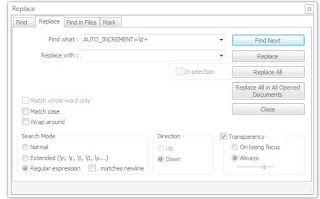
If you are responsible for maintaining database objects structure and want to know what objects are added or dropped from previous application version to the next version, then you have come to the right place. You may need to know the schema difference for any number of purposes like for Application upgrade, Product documentation etc. In this tutorial we will mention how to compare schema of two databases in MySQL. You will need below mentioned tools to do this. MySQL built-in utility: mysqldump Text Editor supporting Regular Expression: Notepad++ File comparison tool: Chose as per your preference, I used Beyond Compare 1. Take the backup of schema for the databases For the purpose of this tutorial we will assume that we need to compare DB schema for two databases appVer1 and appVer2. Take the backup as follows: (Provide password when prompted and press Enter key.) For appVer1 : mysqldump -h your_db_host -u your_db_user -p --single-transaction --skip-comment...

How to check fragmentation in MySQL tables

MySQL tables, including MyISAM and InnoDB, two of the most common types, experience fragmentation as data is inserted, updated and deleted randomly. Fragmentation can leave large holes in your table, blocks which must be read when scanning the table. Optimizing your table can therefore make full table scans and range scans more efficient. We will mention how to check fragmentation in MySQL tables using SQL queries. USE < put_your_dbname_here > SELECT TABLE_NAME, CONCAT(ROUND(( data_length + index_length ) / ( 1024 * 1024 ), 2), 'M') TOTAL_SIZE, CONCAT(ROUND(( DATA_FREE ) / ( 1024 * 1024 ), 2), 'M') DATA_FREE FROM information_schema.TABLES where table_schema = database() and ROUND(( DATA_FREE ) / ( 1024 * 1024 ), 2) > 0.00 ORDER BY DATA_FREE DESC; SELECT TABLE_NAME, ROUND(((Data_length - (TABLE_ROWS * Avg_row_length))/Data_length) * 100, 2) FRAG_Percent FROM information_schema.TABLES where table_schema = database() and TABLE_ROWS > 0 ...
Back To Top